
I Built a 3-Skill AI Content System for Churches in One Claude Code Session
Three production skills. One real church. Every sermon turned into a week of content. Here is the full session.

Sunday night, I gave Claude Code a brief and three sermon transcripts. One from that days sermon.
A few hours later I had a working 3-skill AI content system for churches. Not a prototype. Not a wireframe. Three production skills that I am using right now to onboard Digital Pastor AI clients.
The system does three things. It profiles the community a church is trying to reach. It captures the pastor’s unique voice so AI-generated content sounds like the pastor, not a marketing agency. And it takes a single sermon transcript and turns it into a full week of paste-ready social content, email devotionals, video clip guides, and small group discussion questions.
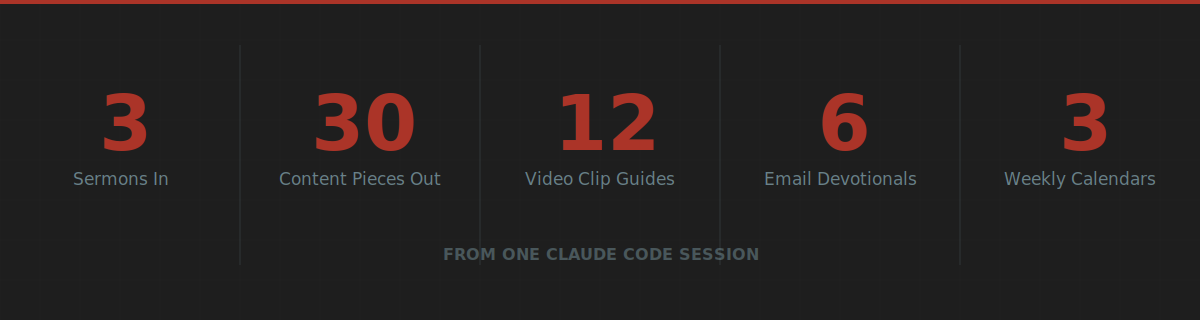
Three sermons from one church produced 30 content pieces, 12 video clip guides with exact edit points, 6 email devotionals, and 3 complete weekly content calendars.
Here is the full session. What I set up beforehand. What I prompted. What broke. And the one file that made the whole thing work.
Why Claude Code, Not the Chat Interface
Tuesday I wrote about five ways to build AI agents. Claude Projects scored highest for content and strategy work. But there is a category I did not cover: building entire skill libraries from the terminal.
Claude Code is different from the chat interface in three ways that matter for this kind of build.
First, it reads and writes files on your machine. It does not generate text you copy and paste. It creates the actual files, in the actual directory structure, with the actual formatting ready to deliver to a client.
Second, it runs iteratively. When something breaks or an output falls short, Claude Code reads the problem, diagnoses the issue, and fixes it in the same session. The same cycle a developer runs manually, except it handles the loops while you make the judgment calls.
Third, it operates from a CLAUDE.md file. This is the instruction set Claude reads before every session. Your brand voice. Your project architecture. Your quality standards. Your constraints. Load it once and every session starts with full context.
That third point is the one nobody talks about enough. The CLAUDE.md file is the difference between Claude Code generating generic output and Claude Code building exactly what your specific domain requires.
The Setup: What I Prepared Before Typing a Single Command
I did not open the terminal and start prompting from scratch. That is the single-shot approach applied to agentic coding. It produces the same mediocre results.
Here is what I prepared first.
The CLAUDE.md file. Mine includes four sections:
Project context. What I am building. Who it is for. What the Digital Pastor AI product does and how these skills fit into the client onboarding workflow.
Architecture constraints. File structure. Naming conventions. Output format standards. What NOT to build (no theology opinions, no political content, no guilt-based marketing language).
Voice and quality rules. The church content system needed to understand pastoral warmth, zero-pressure language, and the gap between church insider jargon and how unchurched families talk. I loaded explicit language maps: “fellowship” means community. “Stewardship” means generosity. “Lost” is insider language that unchurched people hear as condescending.
Reference files. Pointers to existing skill templates, the Digital Pastor brand guide, and example outputs from previous iterations.
That file took 20 minutes to write. It saved hours of correcting bad output.
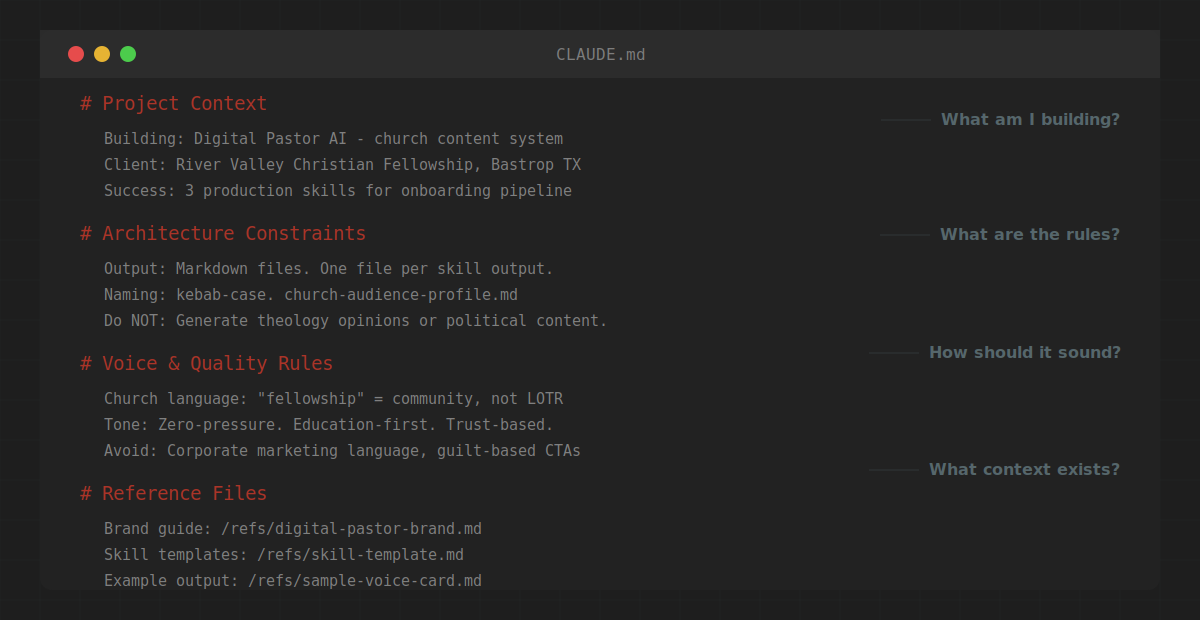
Here is the section that did the most work. The voice and quality rules:
# Voice & Quality Rules

## Church Language Map
- "fellowship" = community (not a Lord of the Rings reference)
- "stewardship" = generosity and responsibility
- "lost" = insider language. Do not use in outreach content.
- "saved" = insider language. Use "faith" or "relationship with Jesus" instead.

## Tone Rules
- Zero-pressure. Education-first. Trust-based.
- The visitor is the hero. The church is the guide.
- No guilt. No urgency tactics. No scarcity language.
- If it sounds like a SaaS landing page, rewrite it.

## Content Guardrails
- Do NOT generate theology opinions or doctrinal positions.
- Do NOT include political content or partisan references.
- Do NOT invent stories, quotes, or illustrations not in the source.
- Extract. Do not create.
Without that section, the system defaults to corporate marketing language. With it, the system understands that “come check us out this Sunday” is the right voice for a church invitation and “schedule your free consultation today” is not.
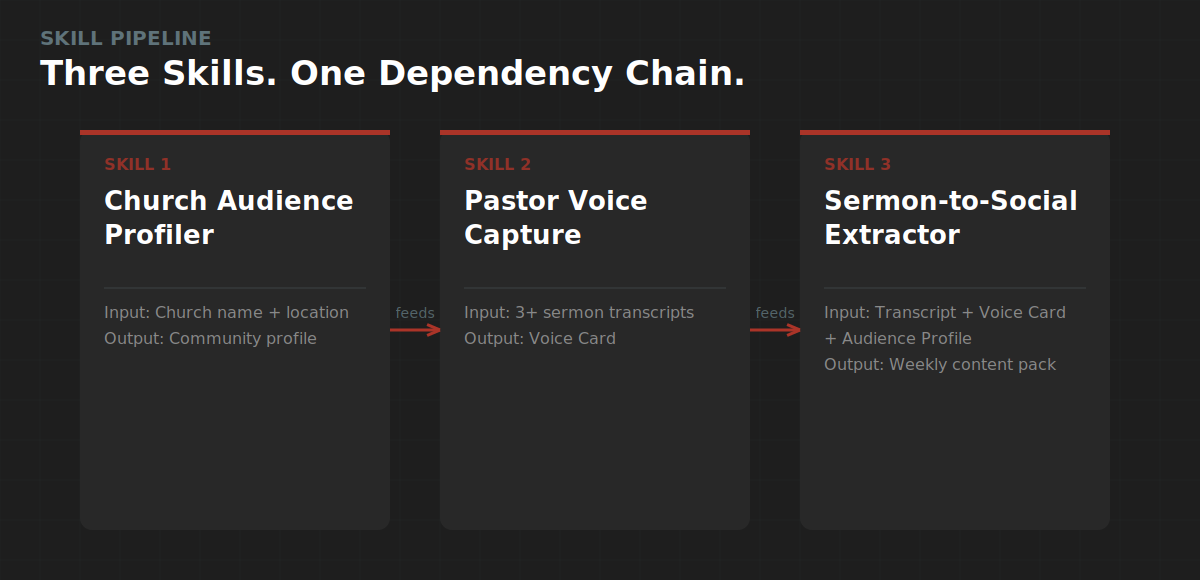
The brief. One document. Three skills. Clear inputs and outputs for each.
Skill 1: Church Audience Profiler. Input: church name, location, who they are trying to reach, and what the church is known for. Output: a research-backed community profile mapping demographics, felt needs in secular language, barriers to attendance, trust signals, and a language translation map between church-speak and how real people talk.
Skill 2: Pastor Voice Capture. Input: 2-4 sermon transcripts plus any social media posts or written content. Output: a Pastor Voice Card documenting the pastor’s humor style, teaching patterns, theological voice, signature phrases, and platform-specific adaptation rules.
Skill 3: Sermon-to-Social Extractor. Input: a sermon transcript plus the Voice Card and Audience Profile. Output: a complete weekly content pack with paste-ready social captions, email devotionals, video clip guides, discussion questions, and a content calendar.
The test data. A real church. River Valley Christian Fellowship in Bastrop, Texas. Pastor Cody Whitfill. Three sermon transcripts from two different series: a life-application message on work and laziness from 2 Thessalonians, and two end-times messages from 1 and 2 Thessalonians. I picked sermons from different teaching styles on purpose. More on why in a minute.
The Build: Skill by Skill
Skill 1: Church Audience Profiler
This one ran clean on the first pass.
I gave it two inputs: “young families in Bastrop, TX” and basic context about River Valley. Claude Code ran web research on Bastrop demographics, pulled Barna Group data on church attendance trends, cross-referenced local census data with national patterns, and produced a 2,000-word community profile.
The output mapped three primary felt needs, each backed by specific research: isolation in a transplant community (Bastrop’s population is up 45% since 2020 and most families moved from Austin without a support network), the desire to pass values to the next generation (Barna 2025 data shows Millennial faith commitment rising sharply, driven by parenthood), and financial anxiety in a county where housing costs sit above the national average and maternity care access is designated as low.
It also produced a language translation map. “I need my people” maps to fellowship and small groups. “I need something bigger than work” maps to calling and mission. “I need peace” maps to prayer and pastoral care.
This is the skill that runs fastest and requires the least human input. Two sentences in, a complete community profile out. The Audience Profile feeds both other skills, so building it first was the right call.
Skill 2: Pastor Voice Capture
This one required the most iteration. And that is where the best learning happened.
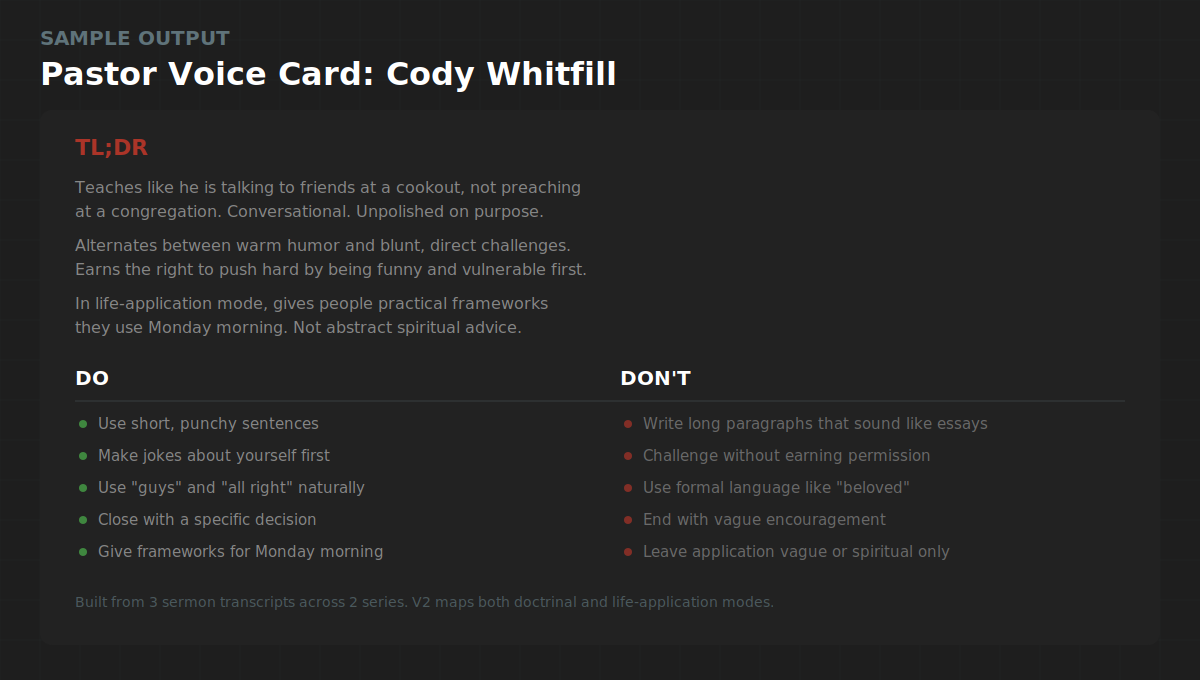
I started with one sermon transcript. The Antichrist message from 2 Thessalonians 2. Heavy doctrinal teaching. The V1 Voice Card was decent. It captured Cody’s humor, his “all right” verbal tic, the self-deprecating family jokes, his “the Bible says” authority marker.
But it was incomplete. One sermon showed me one mode. Cody teaches in at least two distinct modes, and I did not know that until I loaded the second and third transcripts.
The life-application sermon on work and laziness revealed a completely different structure. Longer narrative hooks (a 3-minute story about meeting a CIA operative). A repeatable thesis statement hammered home (”everything that is good or godly requires work” repeated three times). A three-audience closing prayer that segments the room into people doing well, non-believers, and believers who need to change.
The V2 Voice Card, built from all three sermons, maps both modes: doctrinal teaching and life-application. It captures two different story structures (short asides in doctrinal mode, longer narrative hooks in practical mode). It documents signature phrases, a do-and-don’t matrix, and a five-question voice check that any AI-generated content has to pass before publishing.
The lesson: one sermon gives you a sketch. Three sermons from different series give you a fingerprint.
Skill 3: Sermon-to-Social Extractor
This is where the system paid off. And also where the biggest failure happened.
The first version of the extractor produced what I would call a content map. It identified 10 content pieces per sermon, categorized by type (quotable moments, practical takeaways, story clips, discussion starters, community invitations). Each piece had a platform recommendation and an approximate timestamp.
It was organized. It was structured. And it was not usable.
A church communications director looking at “Platform: Instagram carousel” and “Visual prompt: bold white text on dark background” still has to write the carousel copy, draft the caption, build the email, compose the text message, and figure out where to cut the video. That is not a content system. That is a content to-do list.
I rebuilt the output format from scratch.
What Broke (And Why It Matters)
1. The extractor output was a map, not a deliverable.
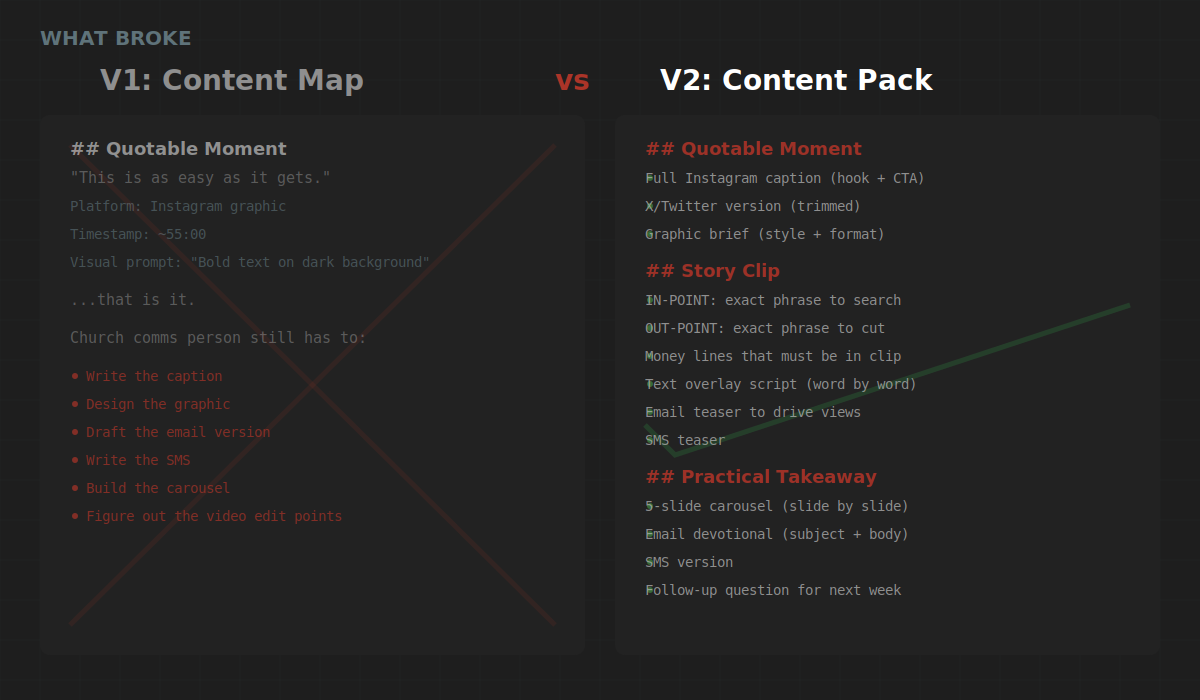
The V1 extraction told you what to post but not how to post it. Every content piece still required a human to write the actual caption, draft the actual email, build the actual carousel slides. For a church with a volunteer communications person running social between their day job and Wednesday night youth group, that gap is a dealbreaker.
The fix: I rebuilt every content category to include the finished product. Quotable Moments now include the full Instagram caption (hook, context, quote, call to action), an X version trimmed for character limits, and a graphic brief. Practical Takeaways include slide-by-slide carousel copy, a complete email devotional with subject line, and an SMS version. Discussion Starters include the full Facebook post copy, an Instagram Stories poll sequence, and a small group guide with icebreaker, four core questions, and a closing challenge.
One sermon now produces a week of content that a church volunteer copies and pastes into their scheduler. No rewriting. No interpretation. Paste-ready.
2. Video clip guidance used timestamps that do not work.
Auto-generated sermon transcripts produce approximate timestamps at best. A clip guide that says “start at 34:00” sends a video editor on a 5-minute hunt through a 45-minute recording. For a church using Descript, YouTube Studio, or CapCut, that friction kills the workflow.
The fix: exact transcript phrases instead of timestamps. Every clip now includes an IN-POINT phrase (the exact words the pastor says at the start of the clip) and an OUT-POINT phrase (the exact words where you cut). Open your video editor. Search the transcript for the IN-POINT phrase. You are on it in seconds. Plus “money lines” that must be in the final cut and text overlay scripts that tell you what words go on screen at what moment.
3. One sermon was not enough for the Voice Card.
This was the failure I did not expect. The first transcript showed me Cody’s humor, his verbal patterns, and his theological grounding. What it did not show me was his range. The doctrinal teaching sermon and the life-application sermon use different structures, different story lengths, different closing patterns, and different levels of direct challenge. Building the Voice Card from one sermon would have produced content that sounded like Cody on an end-times Sunday but not like Cody on a regular Sunday.
The fix: minimum three transcripts from at least two different series or teaching styles. The Voice Card now documents both modes with specific structural patterns for each.
Five Things I Learned
1. The CLAUDE.md file is the product.
Not the prompt. Not the model. The persistent context file that tells Claude Code who you are, what you are building, and what good looks like. Without it, you get generic output. With it, you get output that understands your domain, respects your constraints, and matches your quality bar.
2. Church context requires explicit guardrails.
AI defaults to corporate marketing language. If you do not tell it that churches operate on trust, not transactions, it will produce content that sounds like a SaaS landing page targeting CTOs. The CLAUDE.md needs a dedicated section for domain language, tone rules, and what to avoid. For church content, “zero-pressure” is not a nice-to-have. It is the first rule.
3. Build skills in dependency order.
The Audience Profiler informs the Voice Card. The Voice Card informs the Sermon Extractor. Building them in sequence meant each skill got better because it had context from the one before it. If I had built them in parallel, the Extractor would not know how the pastor talks or who the church is trying to reach. The community invitation at the end of the content pack would have been generic instead of speaking directly to young transplant families looking for their people in Bastrop.
4. The first version is the spec. The second version is the product.
V1 of the Sermon-to-Social Extractor was structured, categorized, and useless to a church volunteer. V2 is paste-ready across every platform. The gap between those two versions is where the human judgment lives. Claude Code built both versions. I made the call that V1 was not good enough and defined what V2 needed to be. That judgment call is the job. The building is the tool.
5. Three sermons reveal what one sermon hides.
One transcript gives you vocabulary and tone. Three transcripts from different contexts give you structural patterns, range, and the edges of a pastor’s voice. The Pastor Voice Card went from a sketch to a fingerprint when the third transcript introduced a teaching mode the first two never showed. This applies beyond churches. If you are building a voice profile for any client, one sample is a demo. Three samples are a system.
The Takeaway
Claude Code is not a chatbot. It is a builder that works from architecture.
Give it a clear CLAUDE.md, a structured brief, and domain-specific context, and it will build production assets in a fraction of the time. Skip the setup and it builds the wrong thing faster.
The three skills I built in this session are now part of every Digital Pastor AI client onboarding. A pastor provides a few sermon recordings. The system profiles their community, captures their voice, and starts producing content that sounds like them. Not like a marketing agency. Like the pastor their congregation already trusts.
That is the Humans + Agents thesis in practice. AI handles the production. The human provides the judgment, the warmth, and the voice.
The CLAUDE.md template I used for this session is below. It is the same structure I use for every Claude Code project. Copy it. Plug in your own context. Your sessions start producing at a different level.
This is the Full Stack Agents Substack. Tuesday’s post covered the 5 ways I tested to build AI agents. Next up: the automation that replaced 4 hours of my weekly content planning.
CLAUDE.md Template
Copy everything below into the root of any Claude Code project directory as CLAUDE.md. Replace the bracketed placeholders with your own context. The more specific you are, the better the output.
# Project Context

## What I Am Building
[Describe the project in 2-3 sentences. Be specific about the deliverable.]

## Who It Is For
[Describe the end user and their context. Include constraints they face.]

## What Success Looks Like
[Define the output quality bar. Be measurable when possible.]
# Architecture Constraints
## Output Format
[Define file types, naming conventions, and structure.]
## File Structure
[Define where things go.]
/skills/ - Skill instruction files
/outputs/ - Generated deliverables
/references/ - Brand guides, templates, example outputs
/test-data/ - Source materials and input files
## Do NOT Build
[Explicit boundaries. What is out of scope. Be specific.
The more boundaries you set, the less you correct later.]# Voice and Quality Rules
## Brand Voice
[Describe the voice in 3-5 bullet points. Use do this / not this examples.]
## Domain Language
[Map insider terms to plain English. This is the section that does the
most work. Every time the AI uses a term your audience would not use,
add it here.]
Example from my church build:
- "fellowship" = community (not a Lord of the Rings reference)
- "stewardship" = generosity and financial responsibility
- "lost" = insider language. Use "not yet connected" instead.
## Tone Rules
[Specific guardrails for tone and approach.]
## Quality Checks
[Define what to verify before the output is considered done.
Make these pass/fail, not subjective.]# Reference Files
## Brand Guide
[Path to your brand voice document or style guide.]
## Templates
[Path to any templates the output should follow.]
## Example Outputs
[Path to examples of what good output looks like.
This is the most underrated section. One good example teaches
the model more than 500 words of instructions.]
## Source Data
[Path to input files for the current session.]How to Use This
Step 1: Copy this into your project root as CLAUDE.md.
Step 2: Replace every bracketed placeholder with your actual context. Delete the examples once you have written your own.
Step 3: Run your first session. Review the output. If something is off, add a rule to the Voice and Quality section that prevents it.
Step 4: Save the updated CLAUDE.md. Every future session reads it automatically.
The file is not a one-time setup. It is a living document. Every time you correct an output, add the correction as a rule. After 3-4 sessions, your CLAUDE.md produces output that matches your standards on the first pass.
If you build something with this template, reply and tell me what you made. I read every response.